



Uluru is the first tool that builds self-awareness and the metacognition necessary for students to become motivated, expert facilitators!
Uluru works seamlessly with your LMS connection to deliver execution guidance, that scaffolds the foundation of executive functioning development. Bridging the gap between cognition and metacognition creates true life-long learners!
Parents create an account, activate a subscription, and then link to their student’s account. It’s that easy!
Our guide to Apple Downtime settings will help you set limits on distractions during homework.
Uluru’s regular price per student is $899/yr. However, Uluru works with schools/districts to provide parents a deeper discount of only $399/yr per student. Contact us to start the process!
Parents have a seamlesss connection to their students’ dashboards. If you have multiple students, all of their information can be accessed from one location with the simple click of a button. You no longer need to sign into multiple accounts to see what’s happening. Parents have an extra view where they can track how well students are working within the application. This gives families more insights in order to positively reinforce or reward students for their hard work.
To further remove the academic burden, parents receive automatic notifications when students begin and submit their work. Additionally, there are other notifications related to specific executive functioning strategies the student executes within the app. This includes, when they prepare assignments, break things down into smaller tasks, set their study schedules, and more. These notifications provide other opportunities to be aware of progress, and positively reinforce these important skills in the moment. Which is most effective way to help students to internalize new skills.
Uluru seamlessly integrates with most popular learning management systems (LMS), including Google Classroom. This means Uluru is able to integrate executive function guidance directly in a students’ homework routine, every time they are working. This consistency is unmatched, and is the best way for students to build the crucial skills necessary to build agency and motivation. If parents have students at other schools that use a different LMS, they can also access that students assignment information from the same dashboard.
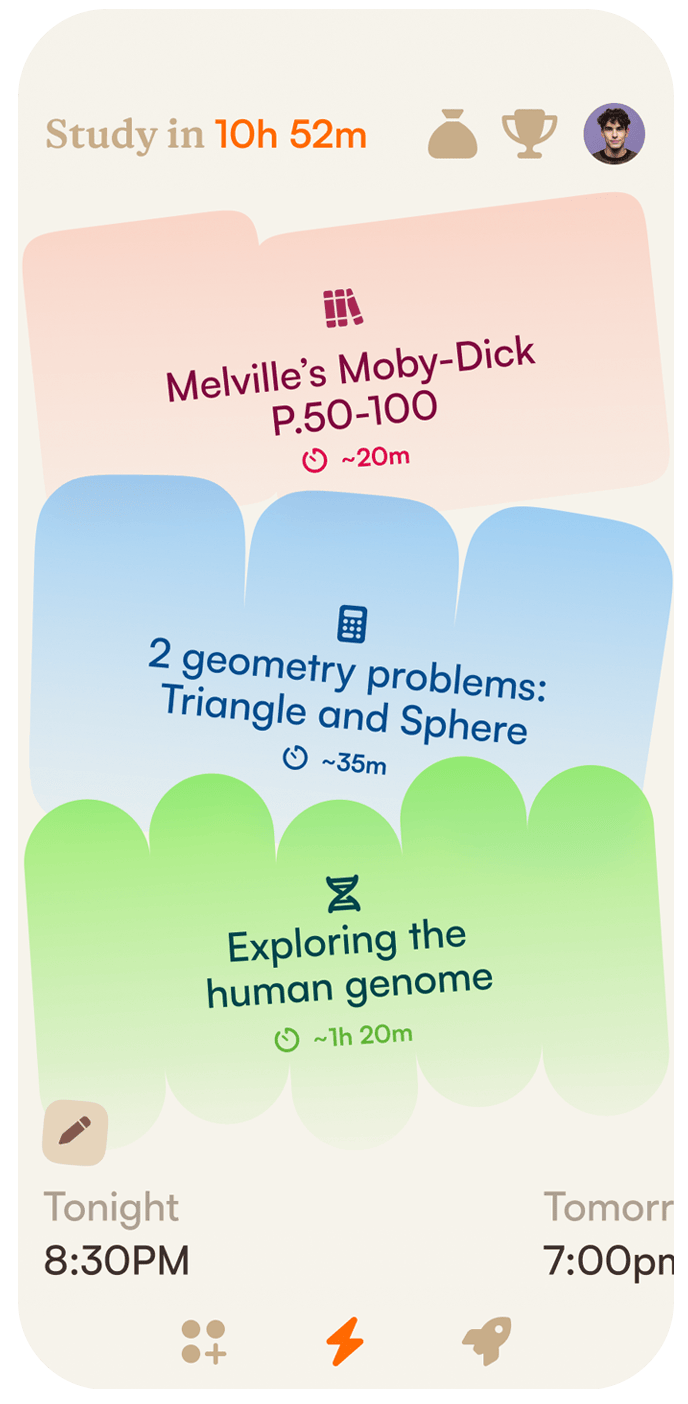
One of the many exciting features is Uluru’s guidance in helping students plan their study schedule each day by prioritizing and sequencing their tasks, setting their study blocks, and estimating time. Students love the independence, parents love not helicoptering. All you need to do is be their biggest cheerleader, not their work police.
Students are encouraged to think about their goals, and plan accordingly. Then it helps them monitor their progress, during and after assignments. Parents are quietly kept in the loop as well, and they can step in to help if needed. If a student doesn’t meet a particular time goal, for example, Uluru will suggest they give themselves more time the next study session. This encouragement to monitor progress is essential for students to build greater self-awareness over time.
Time management is one of the foundational self-regulation skills all students (and adults ;)) need. One of the first things students master is consistently looking at their work load, and determining the amount of time needed to complete a given amount of work. The more students engage with Uluru, the better it adapts and encourages students to make better decisions. It’s almost like a video game, but it’s for school, and all parents need to do is support and motivate. This will help students internalize these skills even faster!
Uluru is constantly updating with new features, and your membership ensures you’ll automatically receive all updates into the future.
**30-day money back guarantee – full refund for families who no longer want to use Uluru within 30 days.
Nina Barraclough is the point of contact for superintendents, and principals who have questions and need support. Feel free to email her directly:
nina@theuluru.com
Uluru is a companion for your student while they complete homework. Since Uluru is built as a native Apple app, it’s easy to manage phone-based distractions using the embedded tools. Apple’s screentime settings allow parents to set limits on non-essential apps, so students can access those that are helpful, and limit those that may be distracting during study time.
Students may use the Uluru app on iPhone, iPad or any browser. As a parent, you can only view your family’s Uluru account settings and assignments via your browser, on any device.
How to set up a Downtime schedule for homework!
To ensure access to Uluru and other educational tools while blocking distractions, use the Downtime feature within screen time settings. This works best when your child is part of your Family Sharing group.
Step 1: Make sure your child is a member of your Family Sharing group.
Step 2: Set Allowed Apps
i. On your device, go to Settings > Screen Time.
ii. Scroll down and select your child’s name below Family.
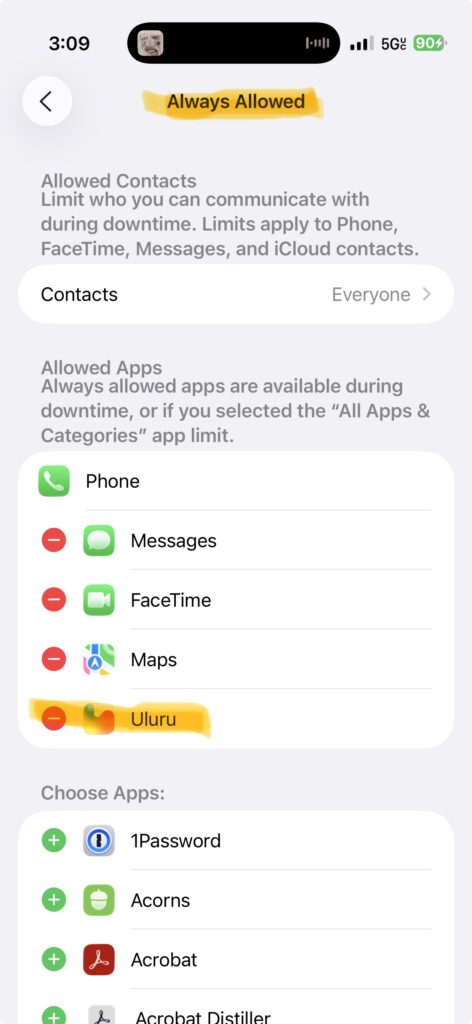
iii. Go to Always Allowed. Find Uluru and tap the plus sign to add it to the Allowed Apps list. You may also want to include other educational apps your child uses.

Step 3: Set a Downtime Schedule
i. Go back to Screen Time
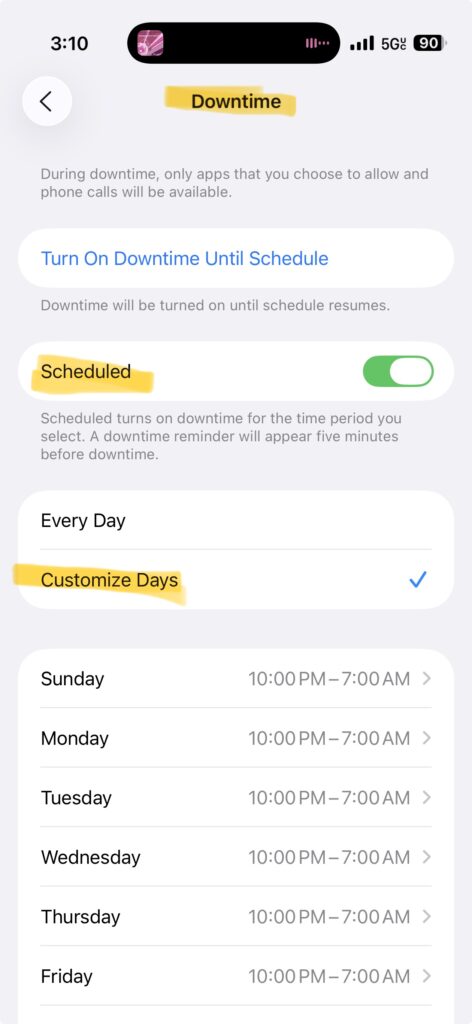
ii. Tap Downtime > Toggle on Scheduled
iii. Select Every Day or Customize Days, then set homework start and end times.