Uluru builds self-awareness and the metacognition necessary for students to become motivated, expert facilitators of their own learning.
Uluru works seamlessly with Bronxville’s Google Classroom connection to deliver execution guidance to reinforce better planning, organization, time management, and beyond — in real time!
Parents create an account, activate a subscription, and then link to their student’s account. It’s that easy!
Instructions to complete Google Classroom access from the Bronxville School tech team.
Uluru’s regular price per student is $75/mo. However, the price for any Bronxville student is $30/mo. This price is locked in forever, including transitions into university.
Parents have a seamlesss connection to their students’ dashboards. If you have multiple students, all of their information can be accessed from one location with the simple click of a button. You no longer need to sign into multiple accounts to see what’s happening. Parents have an extra view where they can track how well students are working within the application. This gives families more insights in order to positively reinforce or reward students for their hard work.
To further remove the academic burden, parents receive automatic notifications when students begin and submit their work. Additionally, there are other notifications related to specific executive functioning strategies the student executes within the app. This includes, when they prepare assignments, break things down into smaller tasks, set their study schedules, and more. These notifications provide other opportunities to be aware of progress, and positively reinforce these important skills in the moment. Which is most effective way to help students to internalize new skills.
Uluru seamlessly integrates with most popular learning management systems (LMS), including Google Classroom. This means Uluru is able to integrate executive function guidance directly in a students’ homework routine, every time they are working. This consistency is unmatched, and is the best way for students to build the crucial skills necessary to build agency and motivation. If parents have students at other schools that use a different LMS, they can also access that students assignment information from the same dashboard.
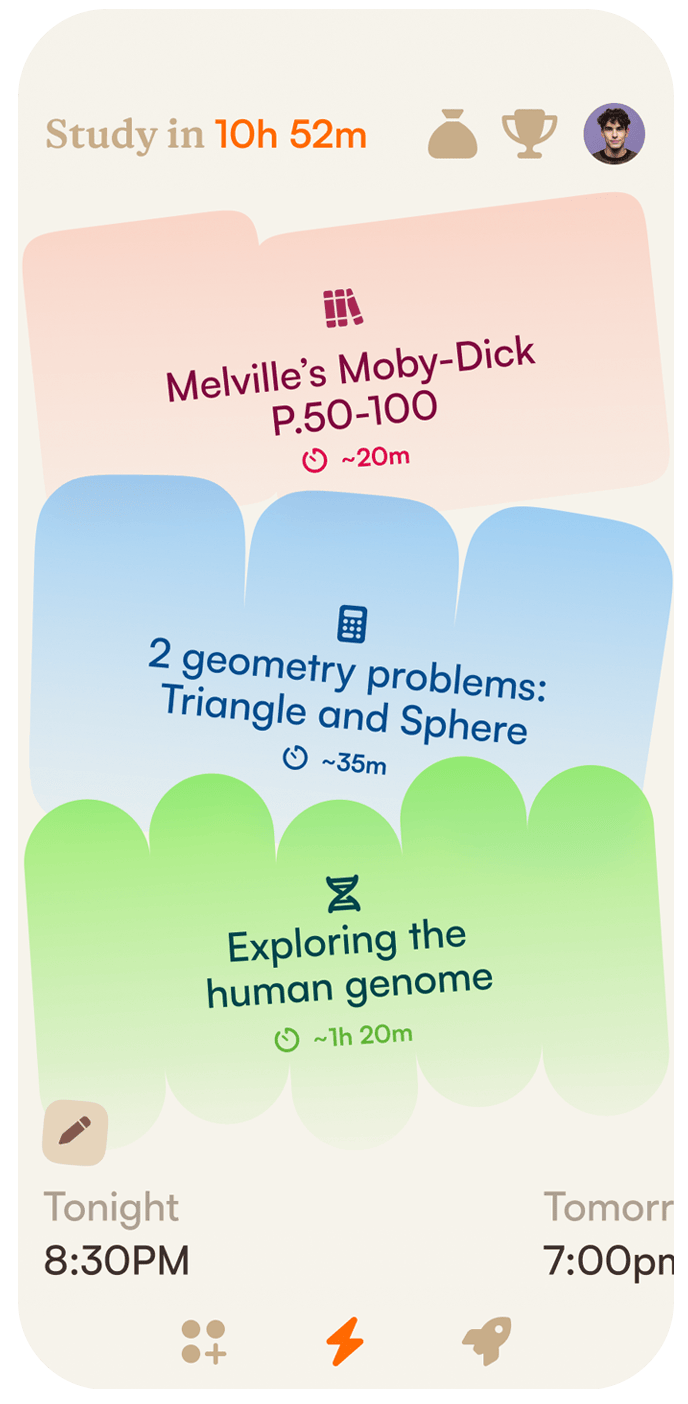
One of the many exciting features is Uluru’s guidance in helping students plan their study schedule each day by prioritizing and sequencing their tasks, setting their study blocks, and estimating time. Students love the independence, parents love not helicoptering. All you need to do is be their biggest cheerleader, not their work police.
Students are encouraged to think about their goals, and plan accordingly. Then it helps them monitor their progress, during and after assignments. Parents are quietly kept in the loop as well, and they can step in to help if needed. If a student doesn’t meet a particular time goal, for example, Uluru will suggest they give themselves more time the next study session. This encouragement to monitor progress is essential for students to build greater self-awareness over time.
Time management is one of the foundational self-regulation skills all students (and adults ;)) need. One of the first things students master is consistently looking at their work load, and determining the amount of time needed to complete a given amount of work. The more students engage with Uluru, the better it adapts and encourages students to make better decisions. It’s almost like a video game, but it’s for school, and all parents need to do is support and motivate. This will help students internalize these skills even faster!
Uluru is constantly updating with new features, and your membership ensures you’ll automatically receive all updates into the future.
**30-day free trial** No charge if you no longer want to use Uluru after 30 days.
Join us at the Bronxville Library for our panel discussion with Ellen Galinsky, and Dr. Eliot Goldman. We’ll discuss new research and guidance on building and maintaining agency and autonomy in your students. Just a few tickets remaining!
Uluru complimentary accounts grant full access to our growing library of videos digital resources and monthly newsletter. At no cost!
These accounts are perfect for families who want to learn more, or those who want assistance with connecting Uluru with their school. Don’t worry, you can always purchase student subscriptions when you’re ready. After you register you’ll have immediate access to your dashboard, and you may begin watching our first video series with Owen Lewis, MD, child psychiatrist and professor at Columbia University.
Completing Google Classroom setupWe’re thrilled to have you join us! To kickstart the journey toward developing lasting skills, there’s just one more thing to do. Kindly request Google Classroom access from The Bronxville School to complete your child’s Uluru setup. Linking Uluru to Google Classroom Bronxville School policy requires a parent email to the Director of Technology to enable this access. Students should also request access inside the app or in the web version of Uluru. Parents: Compose an email to Mr. Ashley at bashley@bronxvilleschool.org and CC your student. See below for a sample email you can cut and paste. Students:
|
Hi Mr. Ashley, I’m the parent of [Your student’s name] . I’d like to request Google Classroom integration for the Uluru app. I’m writing to let you know that I give my consent to share my child’s assignment data with Uluru. Thank you, [Your name] Parents and students will get an email from Mr. Ashley confirming access to Uluru. |
Nina Barraclough is the point of contact for Bronxville parents who have questions and need support. Feel free to email her:
nina@theuluru.com